Developer vs. DevOps: Who Does What?
An in-depth, practical comparison between Software Developers and DevOps Engineers. Explore their core differences, daily responsibilities, pipelines, shared workflows, and frequently asked questions.

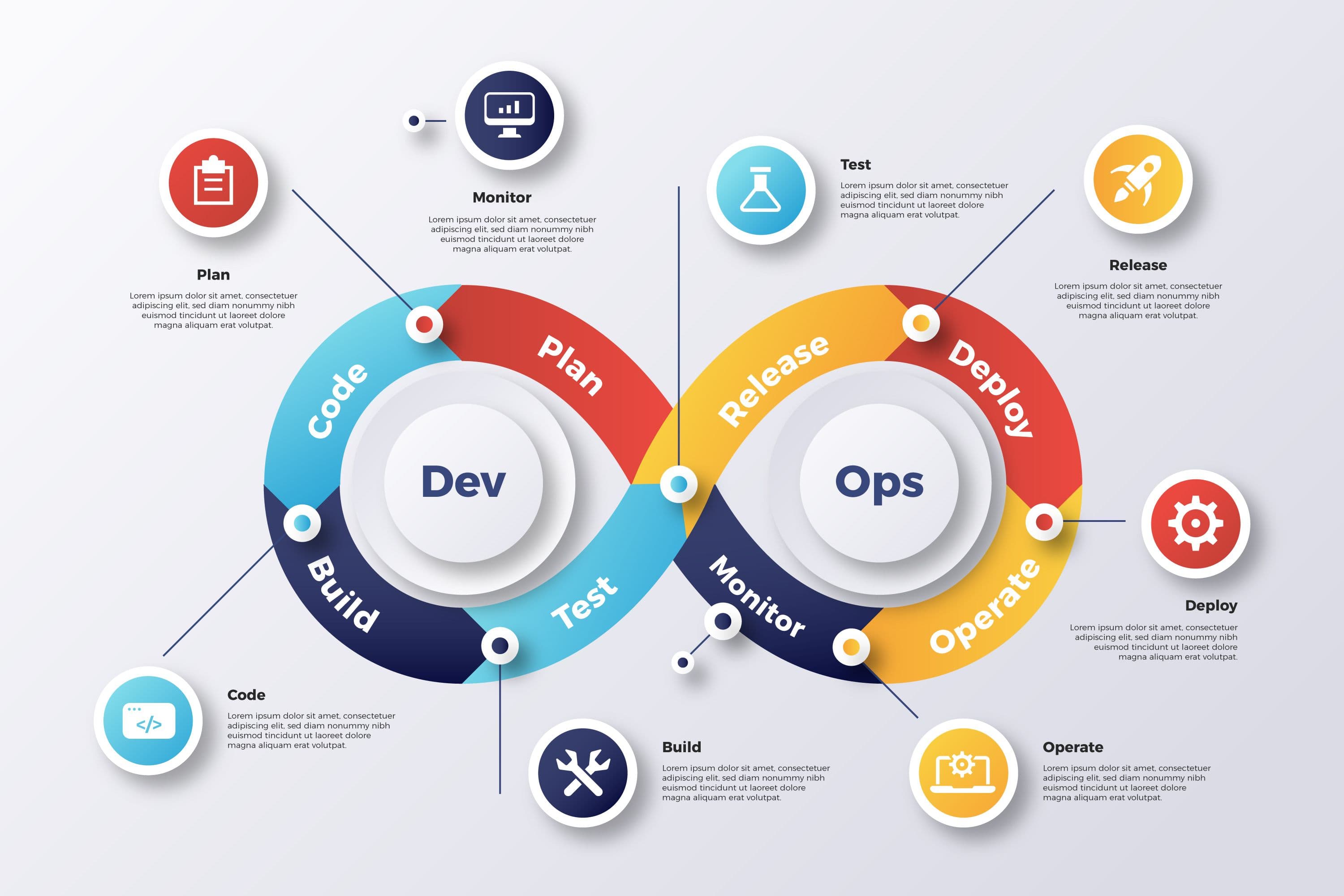
Developer vs. DevOps: The Ultimate Masterclass
If you’ve spent any time in the modern tech ecosystem, you’ve probably noticed that the boundary between writing software and running it has blurred. Years ago, the line was clear: developers wrote the code and threw it "over the wall" to the operations team, who then figured out how to deploy and keep it running.
Today, that wall has been demolished. Terms like Developer, DevOps, Platform Engineer, and SRE (Site Reliability Engineer) are co-dependent partners in a unified pipeline.
Yet, confusion remains. Who actually writes the feature logic? Who manages the Kubernetes clusters? Who owns the deployment pipeline? and most importantly, how do these roles interact daily to push code to millions of users?
This guide is a comprehensive, 15-minute deep dive into the roles, toolsets, philosophies, and daily realities of Developers and DevOps Engineers.
1. The Historical Silos: Why DevOps Emerged
To understand the difference between a Developer and a DevOps Engineer, we have to look back at why DevOps exists. Historically, software companies had two distinct, often adversarial departments:
- Development (Dev): Measured on velocity—how many features they could ship.
- Operations (Ops): Measured on stability—maintaining 99.9% uptime and avoiding failures.
This created a fundamental conflict of interest. Developers wanted to change things rapidly, while Operations wanted to keep things exactly the same because changes introduce risk.
The developer would write code on their laptop, declare "It works on my machine!", package it into a zip file, and hand it over to Operations. If it crashed in production due to environmental differences, Operations blamed the Developer's code, and the Developer blamed the Operations server configuration.

DevOps emerged in the late 2000s as a cultural movement to break down these silos by uniting software development and software operations under a shared set of values, automation tools, and metrics.
2. Who is the Software Developer?
A Software Developer (or Software Engineer) is primarily responsible for translating business requirements into working software. They are builders, architects, and problem solvers of user-facing systems and internal APIs.
The "Inner Loop" of Development
Developers operate heavily within the Inner Loop of software engineering. The Inner Loop is the iterative process of writing code, building, and testing it locally until it works. It is the phase of creation and engineering before the code gets merged into the shared repository.
1. Write Code & Implement Logic
Developers write product code using programming languages like TypeScript, JavaScript, Rust, Python, or Go. They build components, setup state machines, write routing logic, and format data schemas.
2. Compile & Local Run
Bootstrapping the app locally to test initial execution behavior. Developers use local bundlers like Vite, Turbopack, or Webpack to run local development servers (e.g., at localhost:3000).
3. Debug, Verify & Test
Running unit and integration tests (e.g., using Jest, Playwright, Vitest) to verify feature correctness. Fixing logic bugs, managing race conditions, and optimization.
Core Responsibilities
- Feature Delivery: Building responsive user interfaces, writing scalable backend services, and modeling database relationships.
- Code Quality & Maintenance: Ensuring code is clean, readable, well-commented, and conforms to industry design patterns.
- Application Security: Sanitizing inputs, implementing authentication/authorization protocols (like JWT or OAuth), and encrypting sensitive user data at the application layer.
- Local Testing: Writing comprehensive unit, integration, and end-to-end tests to guarantee regression safety before merging.
A Day in the Life of a Developer
- 09:30 AM: Standup meeting. Discuss sprint tasks, highlight blockers in API designs, and align with design/product teams.
- 10:00 AM: Deep-work session. Write a new React dashboard component and integrate it with a Prisma backend API route.
- 02:00 PM: Review a peer's Pull Request. Discuss code improvements, check for potential race conditions, and verify TypeScript types.
- 03:30 PM: Write unit tests to cover edge cases in user registration validation logic.
- 05:00 PM: Debug a complex frontend state management bug reported by QA testers in the staging environment.
3. Who is the DevOps Engineer?
A DevOps Engineer is not just someone who writes scripts. They are platform and automation architects who build the infrastructure, pipelines, and guardrails that allow developers to ship their code safely, reliably, and rapidly.
The "Outer Loop" of Engineering
DevOps engineers design and maintain the Outer Loop, which starts after a developer commits their code. The Outer Loop covers integration, release, hosting, monitoring, and scaling.
1. Continuous Integration (CI)
Automating build checks, running test suites, linting, and scanning for security secrets inside the codebase. The goal is to verify that any incoming pull request doesn't break the existing code.
2. Continuous Delivery (CD)
Packaging the build into a container (e.g., Docker) and deploying it automatically to staging or preview environments.
3. Orchestration & Cloud Infrastructure
Deploying the container to production server clusters (e.g., Kubernetes) and configuring scaling parameters.
4. Observability & Log Analysis
Monitoring server health, gathering logs, setting up alerts, and feeding usage metrics back to developers.
The CALMS Framework
DevOps is governed by five main pillars known as CALMS:
- Culture: Fostering shared responsibility between developers and operations teams to prevent finger-pointing.
- Automation: Eliminating manual human tasks through code. If something is done more than twice, it should be automated.
- Lean: Shipping small incremental changes frequently to minimize the blast radius of errors and speed up feedback.
- Measurement: Collecting data on server performance, build success rates, deployment frequency, and error rates.
- Sharing: Documenting lessons learned, post-mortems, and building shared reusable infrastructure modules.
A Day in the Life of a DevOps Engineer
- 09:30 AM: Standup meeting. Highlight build pipeline blockages, discuss cloud budget trends, and coordinate database migration steps.
- 10:00 AM: Modify Terraform files to provision a new AWS RDS database instance with multi-AZ replication.
- 12:00 PM: Debug a failing CI build runner that is running out of disk space due to container cache buildup.
- 02:00 PM: Configure Prometheus alerts to send Slack notifications when API response latency exceeds 500ms.
- 04:00 PM: Write and optimize a Dockerfile to reduce a production container image size from 1.2GB down to 150MB using multi-stage builds.
- 05:30 PM: Hold a post-mortem meeting to review a minor staging database outage and write preventative runbooks.
4. Repository Structure Comparison
To see how their worlds intersect, let's look at a typical folder structure for a modern, containerized full-stack application. You'll notice development files and operations configurations sitting side-by-side.
While the developer spends 90% of their time inside the src/ directory building UI and business logic, the DevOps engineer is focused on fine-tuning Dockerfile, Kubernetes configurations, and the automation scripts under .github/workflows/.
5. Coding Styles: Dev Route vs. DevOps Config
Let’s look at what each engineer actually writes. Click through the tabs below to contrast a typical backend user sign-up route written by a developer with a terraform configuration written by a DevOps engineer.
// src/app/api/signup/route.ts
// The developer writes code to handle API calls, validate data, and save users.
import { NextResponse } from 'next/server';
import { prisma } from '@/lib/prisma';
import bcrypt from 'bcrypt';

const EMAIL_REGEX = /^[^\s@]+@[^\s@]+\.[^\s@]+$/;

export async function POST(request: Request) {
  try {
    const body = await request.json();
    const { email, password, username } = body;

    // 1. Strict validation checks
    if (!email || !password || !username) {
      return NextResponse.json(
        { error: 'Missing required fields: email, password, username' },
        { status: 400 }
      );
    }

    if (!EMAIL_REGEX.test(email)) {
      return NextResponse.json(
        { error: 'Invalid email format' },
        { status: 400 }
      );
    }

    if (password.length < 8) {
      return NextResponse.json(
        { error: 'Password must be at least 8 characters long' },
        { status: 400 }
      );
    }

    // 2. Check if the user already exists in PostgreSQL
    const existingUser = await prisma.user.findUnique({
      where: { email },
    });

    if (existingUser) {
      return NextResponse.json(
        { error: 'A user with this email already exists' },
        { status: 409 }
      );
    }

    // 3. Hash password with bcrypt (salt rounds = 10)
    const hashedPassword = await bcrypt.hash(password, 10);

    // 4. Create and persist user in the database (excl. password in response)
    const user = await prisma.user.create({
      data: {
        email: email.toLowerCase(),
        username: username.trim(),
        password: hashedPassword,
      },
      select: {
        id: true,
        email: true,
        username: true,
        createdAt: true,
      }
    });

    return NextResponse.json(
      { success: true, message: 'User registered successfully', user },
      { status: 201 }
    );
  } catch (error: any) {
    console.error('Signup error:', error);
    return NextResponse.json(
      { error: 'Internal server error' },
      { status: 500 }
    );
  }
}
6. Real-Time Collaboration: The Pipeline
To visualize how a Developer and a DevOps Engineer collaborate in real-time, here is a visual flow of a change migrating through the system:
┌─────────────────┐       ┌─────────────────┐       ┌─────────────────────────┐
│ Developer       │ ───>  │ Git Repository  │ ───>  │ GitHub Actions Runner   │
│ (Commits Code)  │       │ (Pull Request)  │       │ (CI check compiles code)│
└─────────────────┘       └─────────────────┘       └─────────────────────────┘
                                                                 │
                                                                 │ Runs Tests & Builds
                                                                 v
┌─────────────────┐       ┌─────────────────┐       ┌─────────────────────────┐
│ Production Host │ <───  │ Docker Registry │ <───  │ DevOps Pipeline         │
│ (Rolling Deploy)│       │ (Stores Image)  │       │ (Packages container)    │
└─────────────────┘       └─────────────────┘       └─────────────────────────┘
7. Technical Comparison Matrix
Here is an exhaustive snapshot of the tools, philosophies, pain points, metrics, and troubleshooting models that define each profession:
| Attribute | Developer | DevOps Engineer |
|---|---|---|
| Output | Code files, visual UI elements, database records | Pipelines, cloud infrastructure, dashboards |
| Philosophy | "How can we build this feature?" | "How can we deploy and monitor this reliably?" |
| Pain Points | Hard-to-reproduce bugs, complex states | Outages, slow deployment pipelines, cloud costs |
| Key Metric | Features shipped, sprint velocity | Mean Time to Recovery (MTTR), Deployment frequency |
| Core Tooling | Next.js, Prisma, React, Express, Jest | Docker, Kubernetes, AWS, Terraform, Ansible |
| Daily Activity | Coding, debugging, code reviews | Writing IaC, fixing pipelines, setting up metrics |
| Scale Focus | Code execution complexity (Big O) | Network requests, container orchestrations, bandwidth |
| Automation | Functional tests, mock services | CI/CD build scripts, server provisioning |
8. SRE vs. Platform Engineering vs. DevOps
As technology has advanced, DevOps has branched into a few distinct sub-disciplines:
- DevOps: A cultural philosophy and approach focused on breaking silos and automating delivery pipelines.
- Site Reliability Engineering (SRE): A software-engineering approach to operations. SREs focus on system availability, latency, error budgets, and ensuring the application scales without failing.
- Platform Engineering: Building "Internal Developer Platforms" (IDPs). Platform engineers create the templates, self-service portals, and pre-configured databases that developers can spin up with one click, reducing cognitive load for developers.
9. Frequently Asked Questions
Absolutely. In many startups, developers wear both hats (often called "Full-Cycle Developers"). However, as an organization grows, managing cloud environments, networking, compliance, and deployment pipelines becomes a full-time specialization requiring dedicated DevOps expertise.
Yes! DevOps engineers write automation code using bash, Python, or Go. They also write Infrastructure as Code (IaC) using tools like Terraform or Pulumi. Their focus is on building automation tooling rather than user-facing product features.
It is both. DevOps started as a cultural movement to break down the silos between Development and Operations teams. Over time, it has evolved into a specialized role focused on the tools and platforms that enable that collaboration.
While DevOps focuses on the pipeline and development speed, Site Reliability Engineering (SRE) focuses on system reliability, service-level objectives (SLOs), and automating operational tasks. DevOps asks "How do we deploy?", while SRE asks "How do we make it failproof?"
Both paths offer highly competitive salaries. DevOps engineers often earn a premium at mid-to-senior levels due to the scarcity of specialists who understand both software engineering and complex cloud infrastructure.
Starting as a Software Developer is generally easier because it focuses on core programming principles. Once you understand how code is written, shifting into DevOps is much smoother as you already understand the needs of the developers you are building platforms for.
10. Conclusion: Breaking Down the Silos
A healthy engineering organization does not have a "wall" between developers and DevOps. Instead, they operate as a feedback loop. Developers write application code, while DevOps builds the automation platforms that allow that code to be shipped and monitored safely.
Pro Tip for Aspiring Engineers
If you are a developer, learning the basics of Docker and CI/CD pipelines will make you twice as valuable to any engineering team. If you are in DevOps, understanding how code works allows you to build much better platforms for your developers.
Recommended Resources
If you want to dig deeper into the world of DevOps and system design, check out these excellent external resources:
The DevOps Roadmap
A comprehensive step-by-step guide to becoming a DevOps engineer, covering technologies, certifications, and pathways.
Docker Documentation
Learn the fundamentals of containerization and how to package your apps to run anywhere.
Written by Dhiraj bhawsar... Happy coding!
What Nobody Tells You About Learning DevOps
How I Built My Portfolio with Next.js and Sanity CMS (And What I Learned)
Published on June 12, 2026